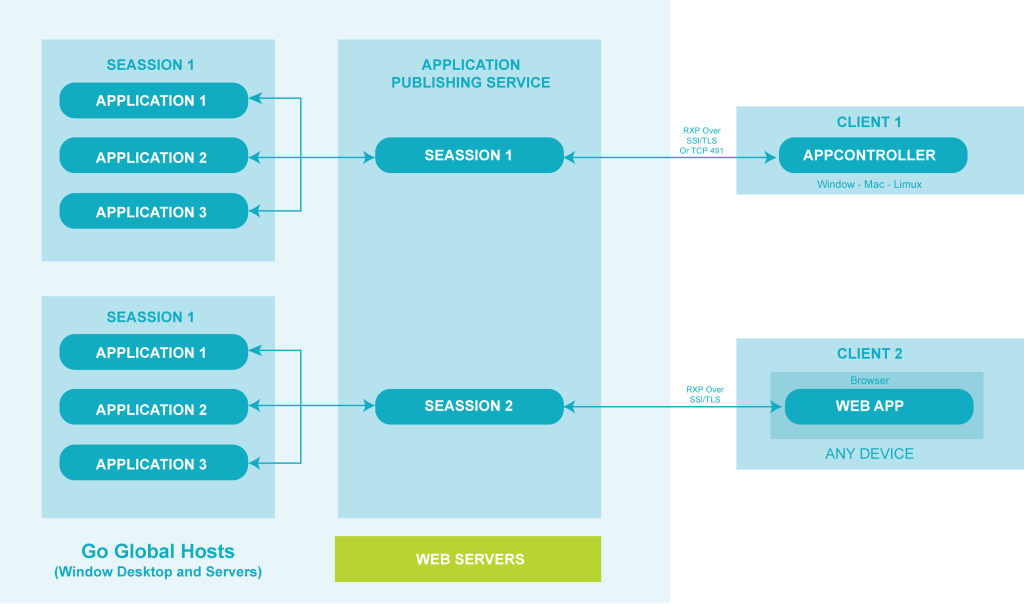
GO-Global is the simplest way to distribute cloud applications. It distributes Windows software across the network for remote clients and mobile devices to access. GO-Global Host runs parallel with the published application on a central computer(s).
GO-Global offers multi-user remote access to Microsoft Windows applications without requiring the usage of Microsoft Remote Desktop Services (RDS) or Windows” built-in multi-session kernel feature. GO-Global fully replaces Microsoft”s multi-session capabilities, as well as its Remote Desktop clients, display driver, protocol, internet gateway, and administrative tools. GO-Global Proprietary architecture avoids the need to install RDS components on Windows desktops or servers. Additionally, GO-Global provides end user logon security via Two-Factor Authentication (2FA) to safeguard against the proliferation of brute force assaults that enterprises utilizing RDS are seeing as a result of the increase in remote worker access to corporate systems.
Applications Access via Go-Global Client and Web App
When accessing Windows applications published via the GO-Global Web App, end users just click the application link in their browser window. The browser establishes a connection to a web server and executes the GO-Global Web Application. Administrators select how the application will open; for example, whether it will fill the browser window or display alongside other information within the browser. Additionally, administrators can command the application to load a certain document or display a particular picture or form when a user hits the application link. If the GO-Global App is installed on the client device, the application can run independently of the browser window and access local files and devices as if it were running locally.